Sony DualSense Wireless Controller Review 2026: A Scam or Legit?
If you are shopping for a PS5 controller right now, you have probably seen dozens of options on the market. But does the original Sony DualSense wireless controller still hold up against its growing competition?
The short answer is yes, and then some. Sony’s DualSense brought a new level of immersion to console gaming with its haptic feedback, adaptive triggers, and refined ergonomic design. Since its launch alongside the PlayStation 5, it has become the gold standard for modern game controllers.
In this review, we break down every feature, every flaw, and every reason you should (or shouldn’t) pick one up in 2026.
Key Takeaways:
- Haptic feedback is a game changer. The DualSense replaces the old rumble motor system with advanced haptic actuators. You can feel rain, footsteps, terrain changes, and explosions with surprising detail. No other standard controller on the market matches this level of tactile immersion at the same price point.
- Adaptive triggers add real depth to gameplay. The L2 and R2 triggers adjust resistance on the fly. Drawing a bow feels different from pulling a trigger, and driving a car gives you actual throttle feedback. This feature alone sets the DualSense apart from every competitor in the standard controller category.
- Battery life has improved significantly. The revised 2025 model reportedly delivers up to 15 hours of battery life with all DualSense features active. This is a massive improvement over the original model, which struggled to hit 6 to 8 hours.
- Built-in microphone and speaker are useful additions. You can jump into voice chat without a headset. The speaker also supports in-game audio cues that add another layer of immersion.
- USB-C charging and Bluetooth connectivity make the DualSense a versatile option for PS5, PC, Mac, and mobile devices. It connects easily and charges quickly.
- The price remains competitive. At around $55 to $70 depending on color, the DualSense offers outstanding value compared to pro controllers that cost $150 to $200 or more.

Sony DualSense Wireless Controller: Design and Build Quality
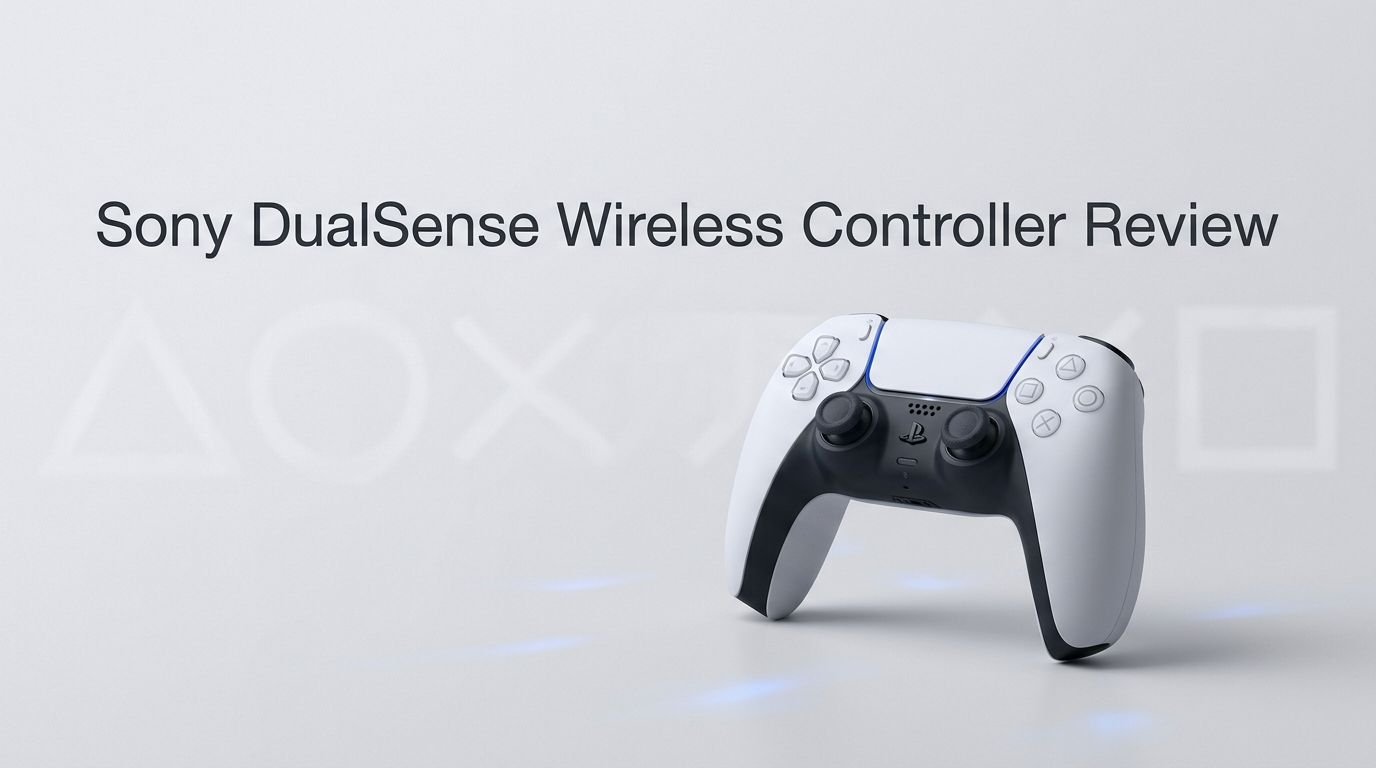
The Sony DualSense wireless controller has a clean, modern design that feels premium the moment you pick it up. Sony moved away from the all-black aesthetic of the DualShock 4 and introduced a two-tone color scheme with the original white model. The controller has since expanded into many color variants, including Midnight Black, Volcanic Red, Sterling Silver, Starlight Blue, and more.
The build quality is solid without feeling heavy. The controller weighs approximately 280 grams, which makes it comfortable for extended gaming sessions. The matte finish on the front and the textured grip on the back prevent your hands from slipping, even during intense gameplay.
Sony also added a subtle textured pattern on the back shell. If you look closely, you will see that the texture is made up of tiny PlayStation button symbols. This is a small design detail, but it shows the attention Sony put into every aspect of this controller. The overall shape is slightly wider and rounder than the DualShock 4. This accommodates larger hands better and reduces cramping during long play sessions.
The buttons and joysticks feel responsive and precise. The D-pad has a satisfying click, and the face buttons provide clear tactile feedback. Everything about this controller screams quality, and it holds up well even after months of heavy use.
Haptic Feedback: Why It Changes Everything
The haptic feedback system is the single biggest reason to own a DualSense controller. Sony replaced the old rumble motors used in the DualShock 4 with a pair of voice coil actuators. These actuators can produce a wide range of vibrations, from soft and subtle to sharp and intense.
In practice, this means you can feel the difference between walking on grass and walking on gravel. You can sense raindrops hitting your character. You can feel the tension of a bowstring as you draw it back. Games like Astro’s Playroom and Returnal showcase this technology at its best.
The haptic feedback also creates a sense of directionality. If something happens on the left side of the screen, you feel it more in the left side of the controller. This spatial feedback adds another dimension to gameplay that standard rumble simply cannot replicate.
Not every game uses haptic feedback to its full potential, and that is worth noting. Many third-party titles still rely on basic vibration patterns. But the games that do take advantage of the technology deliver a truly unique experience. As more developers adopt the feature, the DualSense only becomes more valuable over time.
Adaptive Triggers: A Feature You Did Not Know You Needed
The adaptive triggers on the L2 and R2 buttons are another standout feature. These triggers use built-in motors to adjust resistance in real time. The result is a physical sensation that matches what your character is doing on screen.
For example, in Gran Turismo 7, the R2 trigger simulates throttle resistance. You can feel the engine strain when you push the accelerator too hard. In Ratchet & Clank: Rift Apart, each weapon has a unique trigger feel. A shotgun has a heavy pull, while a rapid-fire weapon has a light, snappy response.
This feature adds a layer of feedback that goes beyond visual and audio cues. It makes gameplay feel more physical and connected. Competitive gamers may want to disable adaptive triggers for faster response times, and the PS5 does allow you to adjust or turn off this feature in the system settings.
The triggers themselves are durable and have held up well in long-term testing. Sony clearly built them to withstand repeated use. The mechanism inside the triggers is smooth and consistent, with no noticeable degradation over time. This is a feature that sounded like a gimmick at launch. But after using it across dozens of games, it has become something that feels missing on any controller that lacks it.
Top 3 Alternatives for Sony DualSense Wireless Controller
If you want more customization, better battery life, or a pro-level feature set, these three alternatives are worth considering.
1. PlayStation DualSense Edge Wireless Controller


2. Turtle Beach Victrix Pro BFG Reloaded Wireless Controller

3. PDP Victrix Pro BFG Wireless Gaming Controller

Battery Life: The Biggest Improvement in 2025
Battery life was the most common complaint about the original DualSense. Early models lasted just 6 to 8 hours on a full charge, which was disappointing given the advanced features draining power. Sony listened to this feedback.
In late 2025, a revised DualSense model began shipping with PS5 consoles. Independent testers found that this updated controller can last up to 15 hours with all features enabled. That is nearly double the original battery life. This change was not heavily marketed by Sony, but modders and reviewers confirmed the improvement.
The controller charges through USB-C, which means you can use the same cable as most modern devices. A full charge takes roughly 3 hours from empty. You can also play while the controller is plugged in, so you never have to stop your session.
Sony also added a battery indicator on the PS5 home screen and on the controller itself. The light bar on the touchpad changes color based on remaining charge. This small quality-of-life feature helps you plan your gaming sessions without getting caught off guard by a dead controller.
If you own an older DualSense model, you can also replace the internal battery with a higher-capacity one. Several third-party battery kits are available on Amazon that push the older model closer to the 10 to 12 hour range.
Built-In Microphone and Speaker
The DualSense has a built-in microphone located between the analog sticks. It allows you to jump into voice chat without connecting a headset. A dedicated mute button sits just below the PlayStation logo, and it glows orange when the mic is muted.
The microphone quality is decent for quick communication. It picks up your voice clearly in a quiet room. However, it does capture background noise more than a dedicated headset would. For competitive gaming or long party chat sessions, a headset is still the better choice.
The built-in speaker on the controller is another underrated feature. It plays contextual audio from games, such as audio logs, radio chatter, or environmental sounds. In Astro’s Playroom, the speaker makes the controller feel like a living part of the game world.
The speaker volume is adjustable through the PS5 settings menu. You can also route all game audio through the controller’s 3.5mm headphone jack if you want a more private experience. This combination of microphone and speaker makes the DualSense a self-contained communication tool right out of the box.
Bluetooth and USB-C Connectivity
The DualSense uses Bluetooth 5.1 for wireless connectivity. It pairs quickly with the PS5 and maintains a stable connection at distances of up to 30 feet in most environments. Input lag over Bluetooth is minimal and unnoticeable during regular gameplay.
For wired play, the controller connects through USB-C. This is a welcome upgrade from the micro-USB port on the DualShock 4. USB-C is faster, more durable, and reversible. You will never fumble with the cable orientation again.
The DualSense also works with PC, Mac, Android, and iOS devices over Bluetooth. On PC, Steam offers native DualSense support, including haptic feedback and adaptive triggers in supported titles. Pairing with a PC is as simple as holding the Create and PlayStation buttons until the light bar flashes.
One thing to note is that haptic feedback and adaptive triggers do not work on every platform or every game. PC support has expanded significantly since launch, but some titles still treat the DualSense as a generic controller. On mobile devices, the controller functions well for cloud gaming services and supported games, though advanced features are typically limited to the PS5.
Comfort and Ergonomics for Long Gaming Sessions
The DualSense is one of the most comfortable controllers Sony has ever made. The wider grip and rounded edges distribute weight evenly across your palms. You can game for hours without experiencing the hand fatigue that plagued the DualShock 4.
The analog sticks sit at a comfortable height and have a concave surface that keeps your thumbs in place. The stick tension is firm but smooth, giving you precise control for both casual and competitive games.
The triggers have a natural curve that fits your index fingers well. The bumper buttons (L1 and R1) are easy to reach without repositioning your grip. The face buttons (Triangle, Circle, Cross, Square) have a low profile with satisfying click feedback.
The touchpad on the center of the controller doubles as a large, clickable button. It is responsive and accurate for games that use swipe or touch input. The Create button (replacing the old Share button) and the Options button are easy to press without accidentally triggering them during gameplay.
Sony designed this controller for all hand sizes. Smaller hands may find the width slightly challenging at first, but most users adapt quickly. Overall, the ergonomics are a clear step forward from the previous generation.
DualSense on PC: How Well Does It Work?
Using the DualSense on a PC has become a much better experience over the past few years. Steam added native support for the controller early on, and it now recognizes the DualSense automatically. You can configure button mappings, adjust haptic intensity, and even set up gyro controls through the Steam controller settings.
Games purchased through Steam that support the DualSense will display PlayStation button prompts. Haptic feedback and adaptive triggers work in a growing list of PC titles, including Final Fantasy XVI, Death Stranding, Alan Wake 2, and others.
Outside of Steam, the experience is more mixed. Some launchers and games require third-party tools like DS4Windows to properly detect the DualSense. Epic Games Store and other platforms have improved their support, but Steam remains the most reliable option.
For wired PC use, you simply plug in the USB-C cable. The controller works immediately without additional drivers in most cases. For wireless use, you will need a Bluetooth adapter if your PC does not have built-in Bluetooth.
The PC experience is not quite as seamless as using the DualSense on a PS5, but it has improved dramatically. If you are a PC gamer who prefers the PlayStation controller layout, the DualSense is one of the best options available today.
Color Options and Special Editions
Sony has released the DualSense in a wide range of colors and special editions. The standard lineup includes White, Midnight Black, Cosmic Red, Nova Pink, Galactic Purple, Starlight Blue, Sterling Silver, Volcanic Red, and more.
Each color variant features the same internal hardware. The price is consistent across most standard colors, though limited editions and special collaborations sometimes carry a premium. The 30th Anniversary Limited Edition DualSense, released in celebration of PlayStation’s history, was a popular collector’s item.
Special edition controllers tied to game launches have also appeared. These feature unique color schemes and design elements that reflect the games they represent. They function identically to standard models but offer a visual flair for fans and collectors.
Sony also sells custom faceplates for the PS5 console, and many gamers like to match their controller color to their console setup. With so many choices, you can personalize your gaming station to suit your style.
If you want a truly custom look, third-party companies offer replacement shells, custom paint jobs, and even LED modifications. The DualSense community has a vibrant DIY scene for anyone who wants a one-of-a-kind controller.
DualSense vs. DualSense Edge: Which Should You Buy?

The DualSense Edge is Sony’s premium controller. It costs around $200, which is roughly three times the price of the standard DualSense. So is the upgrade worth it?
The Edge adds back paddles, adjustable trigger travel, replaceable stick modules, and customizable profiles. You can swap between different control setups on the fly. The stick modules are replaceable, which means you can fix stick drift without buying an entirely new controller.
However, the Edge has a shorter battery life than the standard DualSense. It lasts roughly 6 to 8 hours, compared to up to 15 hours on the revised standard model. The Edge also comes with a braided USB-C cable and a carrying case, which add value to the package.
For competitive players and enthusiasts, the DualSense Edge offers features that justify the higher price. For casual gamers, the standard DualSense delivers 90% of the experience at a fraction of the cost. The standard model’s haptic feedback and adaptive triggers are identical on both versions.
If budget is not a concern and you want maximum control over your gaming experience, go with the Edge. If you want the best value for your money, the standard DualSense remains the smart choice.
Who Should Buy the Sony DualSense Wireless Controller?
The DualSense is the right controller for most PS5 owners. If you play single-player adventure games, action titles, racing games, or any genre that benefits from immersive feedback, this controller will enhance your experience.
Casual gamers will appreciate the comfortable design and easy setup. You charge it, pair it, and start playing. There is no complicated configuration required.
PC gamers who prefer the PlayStation button layout now have strong support through Steam and other platforms. The DualSense works well as a daily driver for PC gaming.
Parents buying for younger gamers should note that the DualSense is slightly larger than the DualShock 4. Children with smaller hands may find it harder to reach all the buttons comfortably.
The only gamers who might want to look elsewhere are competitive esports players who need back paddles, hair trigger locks, or swappable stick modules. For those needs, the DualSense Edge or a third-party pro controller is the better fit.
Final Verdict: Is the Sony DualSense Worth It in 2026?
Yes. The Sony DualSense wireless controller remains one of the best gamepads you can buy in 2026. Its combination of haptic feedback, adaptive triggers, solid build quality, and improved battery life make it a standout in every category that matters.
The revised battery performance addresses the biggest weakness of the original model. The growing PC support makes it more versatile than ever. And the competitive price point keeps it accessible to every type of gamer.
Sony built a controller that changed how games feel. Every pull of a trigger, every rumble in your palms, and every sound from the speaker adds a layer of immersion that other controllers struggle to match. If you own a PS5 and have not upgraded to the latest DualSense model, now is the time. If you are a PC gamer looking for a premium controller experience, the DualSense is among your best options.
It is not a perfect controller. Battery life, while improved, still trails behind the Xbox Wireless Controller. Not every game supports its advanced features. But these are minor drawbacks in an otherwise outstanding package. The DualSense earned its reputation as a generational leap in controller design, and it continues to deliver in 2026.
Frequently Asked Questions
Does the Sony DualSense work with PS4?
No. The DualSense is not compatible with the PS4 console for playing PS4 games directly on that hardware. However, you can use it on a PS5 to play PS4 games through backward compatibility. It also works with PCs and mobile devices.
How long does the DualSense battery last?
The revised 2025 model lasts up to 15 hours with all features enabled. Older models typically last 6 to 8 hours. You can extend battery life by lowering haptic feedback intensity and reducing the brightness of the light bar in the PS5 settings.
Can I use the DualSense on my PC?
Yes. The DualSense works on PC through Bluetooth or a wired USB-C connection. Steam provides the best native support, including haptic feedback and adaptive triggers in compatible games. Some games outside Steam may require third-party tools like DS4Windows.
Is the DualSense Edge worth the extra money?
It depends on your needs. The DualSense Edge offers back paddles, adjustable triggers, and replaceable stick modules for around $200. Competitive gamers will benefit from these features. Casual gamers will find the standard DualSense offers excellent value at a much lower price.
What colors does the DualSense come in?
Sony offers the DualSense in many colors, including White, Midnight Black, Cosmic Red, Starlight Blue, Galactic Purple, Sterling Silver, Volcanic Red, Nova Pink, and various limited edition designs. All color variants share the same internal hardware and features.
Does the DualSense have a headphone jack?
Yes. The DualSense has a 3.5mm headphone jack at the bottom of the controller. You can plug in any wired headset or earbuds for private audio and voice chat during gaming sessions.