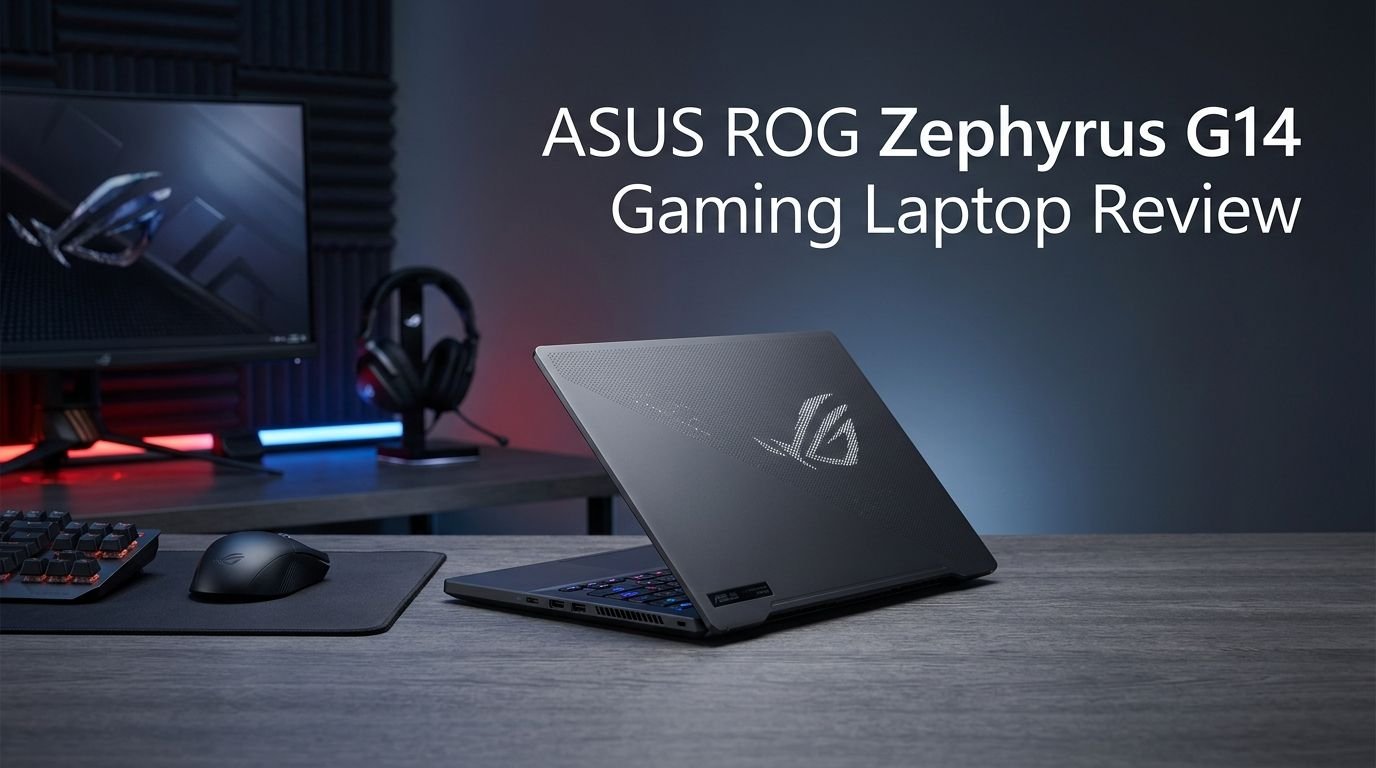
ASUS ROG Zephyrus G14 Gaming Laptop Review 2026: Is It The Best?
The ASUS ROG Zephyrus G14 has been a fan favorite for years. Every new generation raises the bar for what a compact gaming laptop can do.
The 2026 model (GU405) pushes things even further with an Intel Core Ultra 9 386H processor, up to an NVIDIA GeForce RTX 5080 Laptop GPU, and a stunning 3K OLED Nebula HDR display. It weighs just 3.46 lbs and measures as thin as 0.63 inches.
But does all that power in such a small package come with trade-offs? Can it handle AAA games without overheating? Is the battery life any good? And most importantly, is it worth the premium price tag?
Key Takeaways:
- Processor Power: The Intel Core Ultra 9 386H processor delivers strong single-core and multi-core performance. It offers roughly 5 to 10% faster single-core and 10 to 20% faster multi-core speeds compared to its Arrow Lake predecessor. This makes it a solid choice for both gaming and creative workloads.
- GPU Options: The 2026 GU405 model supports up to an NVIDIA RTX 5080 at 130W TGP. That is 20W higher than the previous generation. This means better frame rates in AAA titles and faster rendering in creative apps. A mid-range GA403 variant with an RTX 5060 is also available for budget-conscious buyers.
- Stunning 3K OLED HDR Display: The new ROG Nebula HDR panel reaches 1100 nits peak brightness. It covers 100% DCI-P3 color space and achieves a Delta E below 1 for color accuracy. The 0.2ms response time and 120Hz refresh rate with G-SYNC make gaming smooth and tear-free.
- Thin, Light, and Premium Build: At just 3.46 lbs and 0.63 inches thin, this is still one of the lightest gaming laptops ever made. It uses a CNC-machined 100% aluminum alloy chassis available in Eclipse Gray and Platinum White.
- Improved Cooling System: The updated Tri-Fan Technology, 137 copper fins, liquid metal thermal compound, and redesigned exhaust layout deliver up to 11.4% better airflow. A 0dB ambient cooling mode keeps the laptop silent during light tasks.
- 73Wh Battery with Fast Charging: The battery charges from 0 to 50% in just 30 minutes. Wi-Fi 7, Thunderbolt 5, and a full SD card reader round out the connectivity package.

ASUS ROG Zephyrus G14 (2026) GU405: Design and Build Quality
The 2026 ASUS ROG Zephyrus G14 GU405 is one of the best-looking gaming laptops available today. ASUS uses a 100% aluminum alloy chassis that goes through a CNC machining process with 12 manufacturing steps. The result is a laptop that feels premium, sturdy, and refined.
You get two color options: Eclipse Gray and Platinum White. Both feature a matte anodized finish that resists fingerprints well. The darker variant looks more professional, while the white model gives a clean, modern aesthetic.
The Easylift hinge lets you open the lid with one hand. This may seem like a small detail, but it makes a big difference in daily use. The hinge opens up to 130 degrees, which gives you flexibility for different sitting positions.
At just 0.63 inches thin in the 5060/5070 configuration and 0.72 inches for the 5070Ti/5080 version, this laptop slips into most bags without issue. The weight starts at 3.3 lbs for the lighter config and goes up to 3.52 lbs for the RTX 5080 model. Either way, this is a remarkably light machine for the power it packs inside.
The updated Slash Lighting array on the lid now features 35 distinct lighting zones instead of just 7 from the previous year. It includes 15 preset animations, a battery status indicator, and even a music-reactive mode called Sonic Match. You can also create custom sound effects paired with lighting through the new Slash Mixer tool in Armoury Crate.
Display: 3K OLED Nebula HDR Panel
The display on the 2026 Zephyrus G14 is a genuine standout. ASUS calls it the ROG Nebula HDR panel, and it lives up to the name. This is a 14-inch 3K (2880 x 1800) OLED screen with a 16:10 aspect ratio, 120Hz refresh rate, and 0.2ms response time.
Peak brightness reaches an impressive 1100 nits. For sustained HDR content, you get 700 to 800 nits. Standard SDR brightness sits at 500 nits. That is a major jump from last year’s 400-nit SDR and 500-nit peak numbers. This improvement makes the laptop far more usable in brighter rooms and outdoor settings.
The 1,000,000:1 contrast ratio is only possible because each OLED pixel lights up individually. True blacks look absolutely stunning, and colors pop with incredible vibrancy. The panel covers 100% of the DCI-P3 color gamut with a Delta E below 1. It also carries Pantone color validation and VESA DisplayHDR True Black 1000 certification.
NVIDIA G-SYNC support syncs the panel’s refresh rate with the GPU’s frame output. This eliminates screen tearing and reduces input lag. Dolby Vision support adds dynamic HDR optimization scene by scene. The display also features Corning Gorilla Glass DXC protection and an anti-reflective coating that reduces glare by up to 65%.
For gamers, creators, and media consumers alike, this panel is exceptional. It is hard to find a better 14-inch display on any laptop right now.
Performance: Intel Core Ultra 9 386H and RTX 5080
The 2026 GU405 variant runs on the Intel Core Ultra 9 386H processor built on the Panther Lake architecture. This is a 16-core, 16-thread chip with performance cores clocking up to 4.9 GHz. It delivers noticeable gains over last year’s Arrow Lake H chips, especially in multi-threaded workloads.
For those choosing the AMD route, the GA403 variant offers the AMD Ryzen AI 9 465 (Gorgon Point) with 10 cores and 20 threads. However, this AMD model tops out at the RTX 5060 and 32 GB of RAM. The Intel model goes all the way up to the RTX 5080 at 130W TGP and 64 GB of LPDDR5X-8533 memory.
Gaming performance on the RTX 5080 configuration is stellar for a 14-inch chassis. You can expect smooth frame rates in AAA games at the native 3K resolution with DLSS enabled. Games like Cyberpunk 2077, Alan Wake 2, and Black Myth: Wukong run with high visual fidelity.
Creative workloads also benefit greatly. Video editing in DaVinci Resolve and Adobe Premiere Pro is snappy. 3D rendering in Blender finishes faster than ever. The AI accelerators built into both the CPU and GPU give this laptop extra muscle for generative AI tasks, image upscaling, and AI-powered noise reduction.
Top 3 Alternatives for ASUS ROG Zephyrus G14
1. Razer Blade 14 (2025)

2. MSI Stealth 14 AI Studio

3. Lenovo Legion Pro 5 Gaming Laptop

Thermal Management and Cooling System
Keeping a high-performance laptop cool inside a thin chassis is a challenge. The 2026 Zephyrus G14 addresses this with ROG Intelligent Cooling, a multi-component system that works together to manage heat.
The GU405 RTX 5080 model uses Tri-Fan Technology. A third auxiliary fan pushes hot air from the GPU and VRAM directly to the heatsinks. The dual exhaust heatsink uses 137 ultra-thin copper fins, each just 0.1mm thick. The total heatsink surface area reaches 48,371 mm², which is impressive for a laptop this size.
Liquid metal thermal compound sits between the CPU/GPU and the heat pipes. This provides better thermal conductivity than standard thermal paste. The 4 heat pipes make contact with 42% of the motherboard surface, including VRM circuitry. The redesigned bottom panel features 13,328 precision-cut intake perforations that increase ventilation area by 26%.
ASUS also includes a dust filter over the air intakes. This helps prevent dust buildup that can degrade performance over time. The 0dB Ambient Cooling mode turns off all fans during light tasks like browsing or streaming. Fans kick back on automatically as temperatures rise.
Keyboard and Trackpad Experience
The keyboard on the Zephyrus G14 punches above its weight class for a 14-inch laptop. ASUS equipped it with 1.7mm key travel, which gives each press a satisfying depth. The keycaps feature an anti-fingerprint shine-resistance coating that keeps the keyboard looking fresh even after months of use.
N-key rollover ensures the laptop registers every keystroke, even during intense gaming sessions where you press multiple keys simultaneously. ASUS rates the keyboard for a 20-million keypress lifetime, so durability is solid. Typing noise stays below 30 dB, which makes this one of the quieter gaming keyboards around.
The keyboard also includes single-zone RGB backlighting with Aura Sync support. This lets you color-match the keyboard with other ROG peripherals. The 240Hz polling rate provides fast input registration during competitive games.
The trackpad is extra large for a 14-inch device. It uses a glass surface that feels smooth and responsive. Multi-touch gestures work accurately. ASUS used precision CNC machining to cut the trackpad channel to ultra-tight tolerances, which gives it a flush and seamless appearance.
Windows Hello support comes through an infrared camera, so you can unlock the laptop with your face even in low light. There is no fingerprint sensor, which some users may miss. Overall, the input experience is excellent for gaming, typing, and everyday use.
Audio: Six-Speaker System with Dolby Atmos
Most 14-inch laptops skimp on audio. The Zephyrus G14 does not. It packs a 6-speaker system that includes dual side-firing woofers. The bass extends down to a low 100Hz, which is remarkable for an ultraportable machine.
Dolby Atmos delivers virtual 5.1.2-channel surround sound. This creates a layered, spatial audio experience that pulls you deeper into games and movies. You get specially tuned preset modes for movies and gaming.
The speakers are drilled at 100,000 RPM during manufacturing. This ultra-precise process allows the speaker grilles to span from edge to edge of the chassis. The result is louder, clearer sound with less distortion at higher volumes.
AI Noise Cancellation is built in. It reduces background noise like fan hum, air conditioning, and cafe ambient sounds during voice calls. The feature preserves voice clarity while filtering out steady-state noise. A new Voice Print feature creates a voiceprint of your voice for personalized AI responses. It recognizes individual speakers even in group settings.
Battery Life and Charging
The Zephyrus G14 carries a 73Wh battery, which is solid for a 14-inch gaming laptop. Actual battery life depends heavily on how you use the machine. For web browsing, document editing, and video streaming, you can expect around 6 to 8 hours with the display brightness at moderate levels and Silent mode enabled.
Gaming on battery will drain things much faster. Expect 1 to 2 hours during demanding games. This is normal for any gaming laptop with a discrete GPU, and the G14 is no exception.
Fast charging is a highlight. The laptop charges from 0 to 50% in just 30 minutes. A full charge takes about 90 minutes. The RTX 5080 model ships with a 250W power adapter, while the lower-tier configurations include a 200W adapter. Both models support USB-C charging up to 100W, which means you can top off the battery with a compatible USB-C charger on the go.
The Silent operating mode extends battery life by capping performance and disabling fans under light loads. The ambient light sensor adjusts screen brightness based on your surroundings, which also conserves power. ASUS includes OLED Care features like pixel shift technology that protects the display and reduces static image retention over time.
Connectivity and Ports
Despite its slim profile, the Zephyrus G14 GU405 offers a generous selection of ports. On the left side, you find the DC power jack, HDMI 2.1 FRL for external displays, a Thunderbolt 5 USB-C port (supporting DisplayPort 2.1 and Power Delivery 3.0 at 100W), a USB 3.2 Gen2 Type-A port, and a 3.5mm audio combo jack.
The right side includes another USB 3.2 Gen2 Type-A port, a USB-C 3.2 Gen2 port with data and DisplayPort 2.1 output, and a full-sized UHS-II SD card reader that supports speeds up to 312 MB/s. This SD card reader is a huge perk for photographers and videographers who need fast file transfers.
Thunderbolt 5 on the Intel variant is a significant upgrade over the USB4 on the AMD model. It provides faster data transfer speeds and better external display support. Having USB-C ports on both sides is convenient because you can charge from either direction depending on your desk setup.
Wi-Fi 7 support delivers transfer speeds up to 5.8 Gbps. This is ideal for low-latency online gaming, fast file downloads, and streaming in crowded network environments. Bluetooth 5.4 handles wireless peripherals like controllers, headsets, and mice.
ASUS ROG Zephyrus G14 2026 vs 2025: What Changed?
The 2026 Zephyrus G14 GU405 builds on the foundation of the 2025 GA403. The chassis dimensions are nearly identical. The design language is the same. But there are meaningful upgrades under the hood and on the surface.
The biggest change is the processor platform. The 2026 GU405 moves to Intel Panther Lake (Core Ultra 9 386H) instead of AMD Strix Point. This gives it Thunderbolt 5, potentially better single-core performance, and Intel Arc integrated graphics.
GPU power went up. The RTX 5080 now runs at 130W TGP compared to 110W on the 2025 model. That extra 20W translates to better sustained frame rates during long gaming sessions. The thermal module, while similar in overall design, features a redesigned bottom panel for improved airflow.
The display is brighter. Peak brightness jumps from 500 nits to 1100 nits. Sustained HDR brightness goes from roughly 500 nits to 700 to 800 nits. SDR brightness climbs from 400 nits to 500 nits. This makes the 2026 model much more usable in well-lit rooms.
The Slash Lighting array now offers 35 individually controlled zones instead of 5 grouped zones. The hinge mechanism also received an update with adjustable torque for smoother lid opening. Memory speeds go up to 8533 MT/s from 8000 MT/s on the previous generation.
If you own the 2025 model, the upgrade is incremental but real. If you are buying fresh, the 2026 model is the clear pick.
Who Should Buy the ASUS ROG Zephyrus G14 (2026)?
The Zephyrus G14 fills a unique spot in the laptop market. It is a true gaming laptop that does not look or feel like one. It fits into professional settings, creative studios, and coffee shops just as well as it fits into a gaming den.
Gamers who travel will love the G14. You get RTX 5080 power in a package that weighs under 3.5 lbs. No other 14-inch laptop delivers this much GPU performance in such a compact form factor. If you play competitive esports titles or AAA single-player games, this laptop handles both with ease.
Content creators and video editors benefit from the color-accurate OLED display, fast CPU, and powerful GPU. The DCI-P3 coverage and Pantone validation make it suitable for professional color work. The fast memory and SSD keep editing workflows smooth.
Students and professionals who want a single laptop for both work and play will appreciate the versatile nature of the G14. It handles presentations, spreadsheets, and research during the day. It transforms into a gaming machine at night. The all-day battery life for productivity tasks makes it practical for campus or office use.
However, if you need maximum screen size, a 14-inch panel may feel cramped for extended work sessions. If you need user-upgradeable RAM, the soldered LPDDR5X memory rules that out. And if your budget is tight, the RTX 5080 configuration sits at a premium price point above $3,000 USD.
Software Experience and Armoury Crate
The Zephyrus G14 runs Windows 11 Pro out of the box. ASUS bundles Armoury Crate, its control center software, for managing performance profiles, RGB lighting, fan curves, and system monitoring.
Armoury Crate lets you switch between Silent, Performance, Turbo, and Manual modes with a single click. You can monitor CPU and GPU temperatures, clock speeds, and memory usage in real time. RGB settings sync across all ROG peripherals through Aura Sync.
The new ROG Virtual Assistant is an AI-powered tool built into the 2026 models. It offers an intelligent chat function that helps you use unfamiliar programs. A Librarian function summarizes large documents quickly. The voice transcription feature converts meeting audio into text summaries.
OLED Care protects your display from image retention. It uses pixel shift technology to move displayed content slightly over time. This prevents static elements like taskbars and icons from burning into the screen.
ASUS includes 2 months of Xbox Game Pass. This gives you access to over 200 games right out of the box. Dolby Vision and Dolby Atmos integration come pre-configured for an optimal media experience.
The software experience is polished. Armoury Crate has improved significantly over the years and now runs smoothly without the bloat that plagued earlier versions. The Virtual Assistant adds genuine productivity value, especially for users who juggle multiple tasks throughout the day.
Gaming Performance Benchmarks and Real-World Experience
The RTX 5080 configuration of the Zephyrus G14 delivers strong gaming performance for its size. Running at 130W TGP, the GPU pushes frame rates that compete with larger 16-inch gaming laptops in many titles.
At the native 3K resolution with DLSS Quality enabled, expect frame rates in the 60 to 90 FPS range in demanding titles like Cyberpunk 2077, Alan Wake 2, and Black Myth: Wukong. Dialing down to 1080p pushes frame rates well above 100 FPS in most games.
Esports titles like Valorant, CS2, and League of Legends run at triple-digit frame rates even at high settings. The 120Hz OLED display with G-SYNC ensures these games look buttery smooth with zero tearing.
The 0.2ms OLED response time provides a tangible advantage in fast-paced games. Motion clarity is outstanding compared to traditional IPS panels. You notice the difference immediately during quick camera movements and fast-paced action sequences.
Thermal throttling can occur during extended gaming sessions in Turbo mode, especially if the laptop sits flat on a desk without airflow underneath. Using a laptop cooling stand or simply elevating the rear of the laptop helps maintain consistent performance. The Performance mode strikes the best balance between acoustics and sustained frame rates for most users.
The RTX 5060 configuration in the GA403 variant still handles 1080p gaming comfortably in most modern titles. It is the better value option for gamers who do not need maximum visual fidelity at 3K resolution.
Pricing and Value for Money
The 2026 ASUS ROG Zephyrus G14 commands a premium price. The RTX 5080 GU405 model sits around $3,100 to $3,200 USD at launch. The RTX 5070 Ti variant comes in at a lower price point, typically around $2,000 to $2,400 USD. The AMD-based GA403 with RTX 5060 targets the value segment, aiming for $1,800 to $2,000 USD.
For the RTX 5080 model, you pay a steep premium for the extra GPU power. Whether that price is justified depends on your use case. If you need the absolute best gaming and creative performance in a 14-inch laptop, no other option matches it at this size.
The RTX 5070 Ti configuration offers the best balance of price and performance for most users. You still get excellent gaming performance, the same gorgeous display, and the same premium build. You save over $1,000 compared to the top config.
If budget is a priority, the 2025 Zephyrus G14 models are now available at discounted prices. These still offer strong performance with last year’s hardware and the same great chassis. The 2025 model with an RTX 5080 at 110W might even outperform the 2026 AMD variant in GPU-heavy tasks.
RAM and SSD prices have increased in 2026, which contributes to higher laptop prices across the board. This is an industry-wide issue, not specific to ASUS. Overall, the Zephyrus G14 delivers strong value for what it offers, especially if you pick the right configuration for your needs.
Pros and Cons of the ASUS ROG Zephyrus G14 (2026)
What makes this laptop great starts with its display. The 3K OLED panel is bright, colorful, and incredibly responsive. The build quality is top tier, with CNC-machined aluminum that feels better than most ultrabooks. The performance from the Intel Core Ultra 9 and RTX 5080 is remarkable for a 3.5 lb machine.
The thermal system keeps things under control despite the thin chassis. The six-speaker audio with Dolby Atmos sounds surprisingly full. The fast charging and decent battery life make it a solid travel companion. Thunderbolt 5 and a full SD card reader cover most connectivity needs without dongles.
On the downside, the soldered RAM means you cannot upgrade memory later. The single M.2 SSD slot limits storage expansion. The RTX 5080 model is expensive, sitting above $3,000. The fan noise in Turbo mode gets loud during intense gaming sessions.
The 14-inch screen may feel small for extended productivity work. The AMD variant (GA403) is capped at RTX 5060, which limits its gaming potential. And while battery life is decent for productivity, gaming on battery drains fast, just like every other gaming laptop.
These trade-offs are typical for a compact gaming laptop. The Zephyrus G14 manages them better than most competitors, but buyers should be aware of them before purchasing.
Frequently Asked Questions
Is the ASUS ROG Zephyrus G14 (2026) good for gaming?
Yes. The RTX 5080 configuration at 130W TGP delivers excellent gaming performance for a 14-inch laptop. You can play AAA games at the native 3K resolution with DLSS enabled and get smooth frame rates. Esports titles run at well over 100 FPS. The 120Hz OLED display with G-SYNC ensures tear-free visuals.
How long does the Zephyrus G14 (2026) battery last?
Battery life varies based on usage. For productivity tasks like web browsing, document editing, and video streaming, expect 6 to 8 hours. Gaming on battery lasts about 1 to 2 hours. The fast charging feature brings the battery from 0 to 50% in just 30 minutes.
Can you upgrade the RAM on the Zephyrus G14 (2026)?
No. The RAM is soldered to the motherboard and cannot be upgraded after purchase. The Intel GU405 model offers up to 64 GB of LPDDR5X-8533 memory. The AMD GA403 model maxes out at 32 GB. Choose your configuration carefully at the time of purchase.
What is the difference between the GU405 and GA403 models?
The GU405 uses an Intel Core Ultra 9 386H processor and supports up to an RTX 5080 GPU with 64 GB of RAM. The GA403 uses an AMD Ryzen AI 9 465 processor and maxes out at an RTX 5060 GPU with 32 GB of RAM. The GU405 is the higher-performance option, while the GA403 targets a lower price point.
Does the Zephyrus G14 (2026) overheat?
The cooling system handles heat well for such a thin laptop. Tri-Fan Technology, liquid metal thermal compound, and 137 copper fins keep temperatures in check during most tasks. Extended gaming in Turbo mode can cause thermal throttling if the laptop sits flat on a desk. Using a laptop stand or elevating the rear of the chassis improves airflow and sustained performance.
Is the ASUS ROG Zephyrus G14 (2026) worth the price?
The value depends on the configuration you choose. The RTX 5070 Ti model offers the best balance of performance and price for most users. The RTX 5080 model at over $3,000 is a premium investment best suited for users who need maximum performance in a compact form. The AMD GA403 variant provides a more budget-friendly entry into the Zephyrus G14 experience.